

As a devoted PC Optimum member, you’ve already experienced the program’s numerous benefits. Whether you’re earning points at Shoppers Drug Mart or redeeming them at Loblaw’s grocery stores, the PC Optimum program offers excellent value. This guide will help both beginners and seasoned users understand the login process and troubleshoot common issues, allowing you to manage your points effectively.
Getting Started with PC Optimum
- The Basics: Visit the PC Optimum website or download the PC Optimum app from the Google Play Store or the Apple App Store, based on your smartphone’s operating system.
- Creating an Account: If you haven’t yet created a PC Optimum account, click on “Join PC Optimum For Free” on the homepage. Follow the steps to register and create your account.
Logging In to Your PC Optimum Account
Logging in to your PC Optimum account is simple and straightforward.
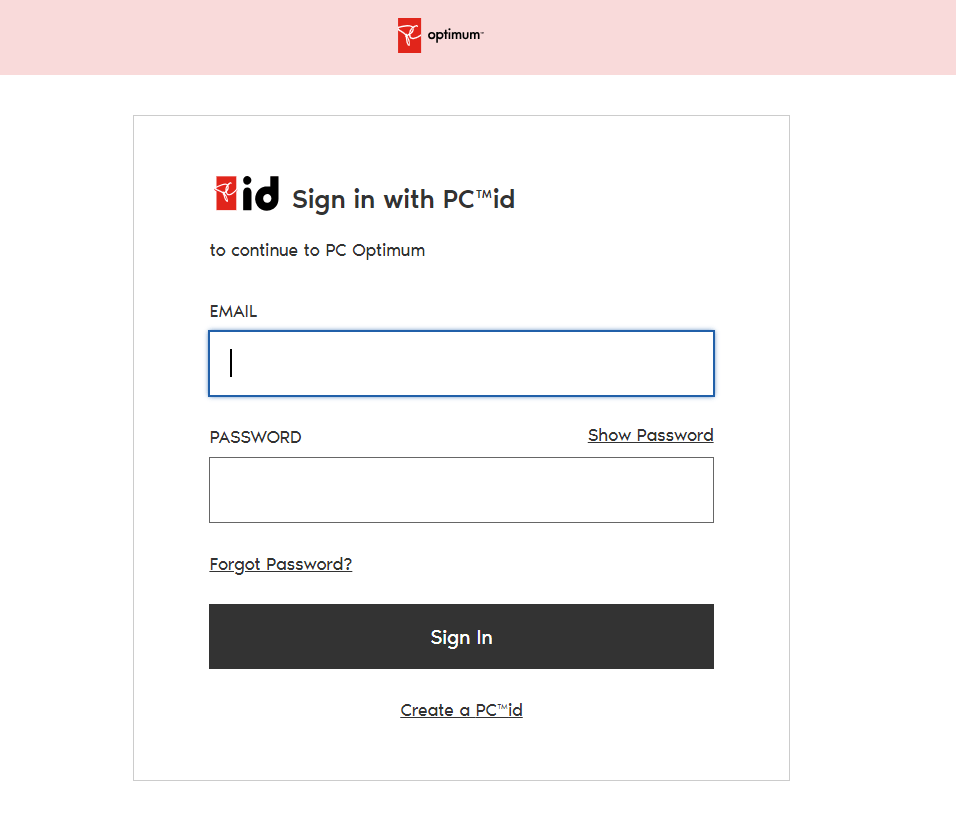
- Entering Your Login Credentials: On the PC Optimum homepage, click on Sign in. Enter your email address or mobile number and password associated with your PC Optimum account, and then click on Sign in.
- Remember Me: If you’re using a personal device, check the Remember Me box. Your login details will be saved for faster access the next time you visit the site or open the app.
Troubleshooting Login Issues
Even as a seasoned PC Optimum user, you may encounter occasional login issues. Here are a few common problems and their solutions.
- Forgotten Password: If you’ve forgotten your password, click on Forgot your password? on the sign-in page. Enter your email address or mobile number linked to your PC Optimum account. You’ll receive instructions to reset your password via email or text message.
- Account Locked: If your account gets locked after multiple failed login attempts, you will need to reset your password. Follow the steps mentioned above.
Navigating the PC Optimum Platform
After a successful login, you’ll land on your dashboard, where you can check your points balance, see personalized offers, and manage your account.
- Reviewing Your Points Balance: The homepage displays your current points balance at the top of the page. You can click on it to see a detailed points history.
- Loading Offers: Scroll down to see your personalized offers. These offers are based on your shopping habits and can help you earn points faster. Click on Load to Card to add these offers to your account.
- Viewing and Managing Cards: Click on “Cards & Accounts” to view all the cards linked to your account. Here, you can add a new card, replace a lost card, or remove an old card.
Enhancing Your PC Optimum Experience
To maximize your PC Optimum experience, here are a few additional tips.
- Linking Your PC Financial Card: If you have a PC Financial credit card, link it to your PC Optimum account to earn points faster.
- Understanding Offers: PC Optimum provides personalized offers based on your shopping habits. Understanding these offers can help you plan your shopping trips and accumulate points more efficiently. Always load these offers to your card before you start shopping.
- Using the PC Optimum App: The PC Optimum app is a convenient tool that puts the entire program at your fingertips. It provides a seamless experience for loading offers, checking points balances, and accessing your digital PC Optimum card.
PC Optimum’s Customer Service
In case you run into any issues or have questions, PC Optimum’s customer service is ready to assist.
- Contacting Customer Service: You can reach out to PC Optimum’s customer service through the “Help” section on the website or the app. You can also call their hotline number provided in the same section.
- Checking FAQs: The Frequently Asked Questions (FAQ) section provides answers to many common queries. Before contacting customer service, you might find it helpful to check this section.
FAQ
What to do if my PC Optimum login is not working?
If you’re having trouble logging into your PC Optimum account, follow these steps:
- Double-check that you’ve entered your username and password correctly.
- Make sure that your internet connection is stable.
- Try clearing your browser’s cache and cookies, then attempt to log in again.
- Try using a different web browser or device.
If you’re still unable to log in after trying these steps, it may be an issue with your account, or there could be a technical issue with the PC Optimum website. In this case, contact PC Optimum’s customer service for further assistance.
Conclusion
Navigating the PC Optimum program becomes a breeze once you understand the login process and the platform’s key features. As a seasoned user, you can efficiently manage your account, load offers, track points, and secure your account.
Remember, the key to getting the most out of the PC Optimum program is actively using and understanding the platform. Regularly check your account for new offers, keep your app updated, and ensure your linked cards are current.
Whether you’re shopping for groceries, picking up a prescription, or fueling up your car, every purchase is an opportunity to earn points. Log in to your PC Optimum account today, and make the most out of every dollar you spend!

Evan McKenzie is a contributor at Vaughantoday.ca, covering a wide range of topics including local news, politics, business, technology, sports, entertainment, and lifestyle. He focuses on clear, balanced reporting that helps readers stay informed about current events and issues that matter to their communities. His work aims to provide useful information, timely updates, and relevant stories presented in an accessible and reader-friendly way.