


Adobe offers a range of creative software and services through its subscription-based Creative Cloud platform. However, there may come a time when you wish to cancel your Adobe subscription without incurring cancellation fees. This article provides a detailed guide on how to cancel your Adobe subscription in Canada while avoiding any potential fees.
Understanding Adobe’s Cancellation Policy
Before attempting to cancel your Adobe subscription, it is essential to understand the company’s cancellation policy. Adobe offers both annual and monthly subscription plans, and the cancellation process may differ depending on your chosen plan. Keep in mind that Adobe’s terms and conditions are subject to change, so always refer to their official website for the most up-to-date information.
- Monthly Subscription Plan
If you have subscribed to a monthly plan, you can cancel your Adobe subscription at any time without incurring any fees. Your subscription will be active until the end of the current billing cycle, after which it will not renew.
- Annual Subscription Plan
For annual plans paid monthly, Adobe typically charges a cancellation fee of 50% of the remaining months on your subscription if you cancel before the end of the annual commitment. However, Adobe offers a 14-day grace period from the start of the subscription during which you can cancel without incurring any fees.
Tips for Canceling Your Adobe Subscription Without Fees in Canada
If you have an annual subscription and want to cancel without incurring fees, consider the following tips:
- Cancel Within the 14-Day Grace Period
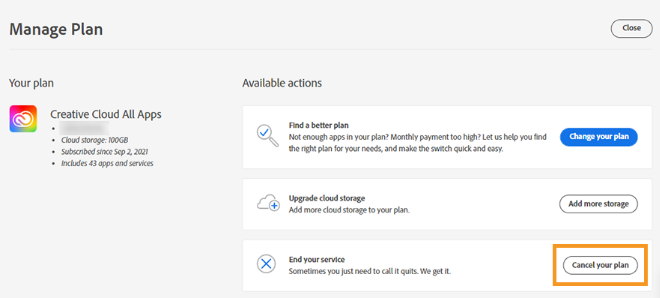
If you are within the 14-day grace period from the start of your subscription, you can cancel without any fees. To do this, follow these steps:
a. Log in to your Adobe account. b. Navigate to the “Manage Account” section. c. Locate your subscription plan and click “Cancel Plan.” d. Follow the prompts to complete the cancellation process.
- Reach Out to Adobe Customer Support
If you are outside the 14-day grace period but have a valid reason for canceling your subscription, consider reaching out to Adobe Customer Support. Explain your situation and request a fee waiver. Adobe may consider waiving the cancellation fee on a case-by-case basis, depending on the circumstances.
- Wait for Promotions or Offers
Occasionally, Adobe may offer promotions that allow subscribers to cancel their plans without fees. Keep an eye on Adobe’s website and promotional emails for any announcements regarding such offers. Canceling during these promotions can help you avoid fees, but it’s essential to act quickly, as these offers are often time-sensitive.
- Downgrade Your Plan
If you cannot cancel your subscription without incurring fees, consider downgrading your plan to a more affordable option. This can help you reduce costs until you can cancel your subscription without fees. To downgrade your plan:
a. Log in to your Adobe account.
b. Navigate to the “Manage Account” section.
c. Locate your subscription plan and click “Switch Plan.”
d. Choose a more affordable plan and follow the prompts to complete the process.
Conclusion
Canceling an Adobe subscription without fees in Canada requires an understanding of the company’s cancellation policy and some strategic planning. By canceling within the 14-day grace period, contacting customer support, waiting for promotions, or downgrading your plan, you can potentially avoid cancellation fees. Remember to review Adobe’s official terms and conditions to ensure you are adhering to their policies when canceling your subscription.

Evan McKenzie is a contributor at Vaughantoday.ca, covering a wide range of topics including local news, politics, business, technology, sports, entertainment, and lifestyle. He focuses on clear, balanced reporting that helps readers stay informed about current events and issues that matter to their communities. His work aims to provide useful information, timely updates, and relevant stories presented in an accessible and reader-friendly way.