

Are you new to ADP, the comprehensive global provider of cloud-based Human Capital Management (HCM) solutions? As an ADP employee, you will likely rely heavily on this platform to access payroll data, time and attendance records, benefits, and other employment details. This article is designed to provide an extensive, step-by-step guide on how to log into the ADP system.
Getting Started with ADP
- System Requirements: First, make sure your device meets the necessary system requirements. Generally, ADP supports recent versions of Internet browsers like Google Chrome, Safari, Microsoft Edge, and Firefox.
- Website or Application: Visit the ADP login page by reaching the ADP website. Alternatively, you can download the ADP mobile app, “ADP Mobile Solutions”, from Google Play Store or Apple’s App Store. This allows you to access your account anytime, anywhere.
Registration Process
If it’s your first time using ADP, you’ll need to register.
- Registration Code: You should receive a registration code from your company’s HR department. If not, reach out to them directly.
- Account Setup: With the registration code, navigate to the ADP site and click on “Register now”. Follow the prompts, input your registration code, and verify your identity. You’ll then be asked to create a unique user ID and password for future logins.
Logging In to Your ADP Account
After registering, you can log in to your account.
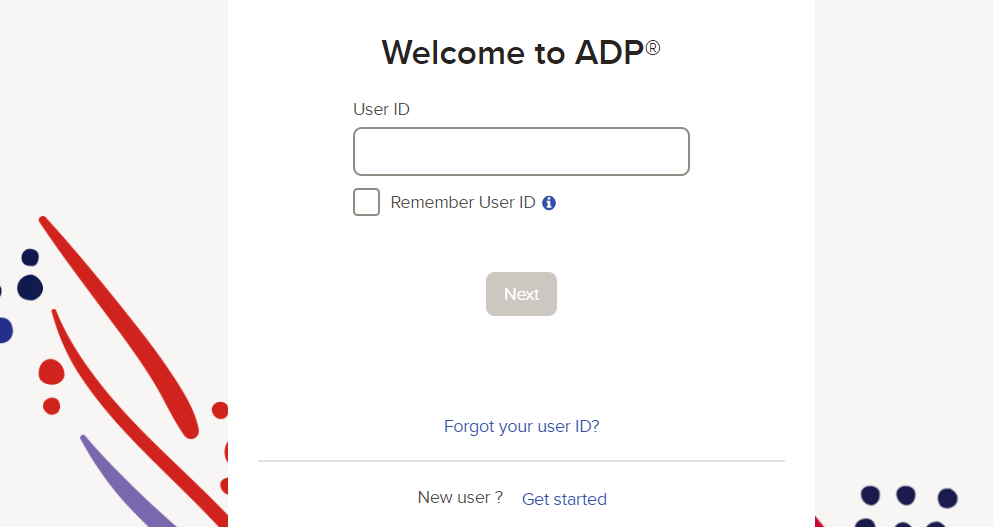
- Entering User ID and Password: On the ADP login page, enter the User ID and password you created during the registration process. Click Log In to access your account.
- Remember My User ID: For easier future access, you can check the box labelled “Remember User ID” before logging in. This way, your User ID will automatically populate the next time you visit the ADP login page.
How to troubleshoot the login issues
Despite best efforts, you may encounter login difficulties. Here’s how to troubleshoot the most common issues.
- Forgotten User ID or Password: If you’ve forgotten your User ID or password, click on “Forgot Your ID/Password?” and follow the instructions to reset it. You’ll need to provide personal information to verify your identity.
- Locked Account: After a certain number of unsuccessful login attempts, your account may be locked for security reasons. You’ll need to contact your HR department or ADP’s service team to unlock your account.
Navigating the ADP Dashboard
Once you’ve successfully logged in, you can start exploring the ADP platform.
- Personal Dashboard: The first screen you’ll see is your personal dashboard. It offers an overview of your most relevant employment details, such as pay, time off, and benefits.
- Pay Tab: By clicking on the Pay tab, you can view your pay statements and annual statements, which you can also print if necessary.
- Time & Attendance: The Time & Attendance tab allows you to track your work hours, request time off, and view your time-off balance.
- Benefits: In the “Benefits” section, you can review your benefits, update your elections, and check your coverage.
Logging Out
When you’re done using the ADP platform, don’t forget to log out.
- How to Log Out: To log out, find your name at the top of the page, click on the arrow next to it, and select Logout from the dropdown menu. Logging out each time you’ve finished with the platform is a crucial step in securing your sensitive personal and financial information.
Additional Tips and Tricks
As you become more comfortable with the ADP platform, here are some additional tips and tricks to help you make the most of its features.
- Notifications: Keep an eye on your notifications; they might contain important information about your payroll, benefits, or time off.
- Profile Updates: It’s essential to keep your profile up to date. You can edit personal information, such as your address and contact details, right from your account.
- Mobile App: The ADP mobile app offers all the same functions as the desktop site, with the added convenience of accessing your data on the go. This can be particularly useful for checking pay stubs, submitting time-off requests, or clocking in and out.
Enhanced Security with ADP
ADP values your security and has put several measures in place to protect your data.
- Two-Factor Authentication: ADP offers two-factor authentication (2FA) for additional account security. When enabled, you’ll be required to provide a second form of identification (typically a code sent to your phone) in addition to your password.
- Regular Password Updates: For your security, ADP prompts you to change your password periodically. Regularly updating your password helps protect your personal and financial information.
FAQ
How can I find my ADP login?
If you’re unsure of your ADP login credentials, you should first check with your employer, as they would typically provide this information to you. If you’ve forgotten your password, you can click on the “Forgot Your Password” link on the ADP login page and follow the instructions.
How do I log into the ADP Mobile App?
- Download and open the ADP Mobile app on your device. It’s available on both the App Store for iOS and Google Play Store for Android.
- On the login screen, enter your ADP username and password in the fields provided. These should be the same credentials you use for the ADP web login.
- Tap the “Login” button to sign in to your account.
Conclusion
Navigating the ADP login process doesn’t have to be daunting. With these step-by-step instructions, you should be able to register, login, and access your account with ease. ADP is a powerful tool designed to make managing your employment details simple and convenient. Whether you need to check your pay stub, request time off, or update your personal information, it’s all available at your fingertips once you’re logged in.
Remember, security is paramount. Always ensure that you logout after each session, particularly when accessing ADP on public or shared devices, and keep your login details confidential.
Should you encounter any difficulties or have questions, don’t hesitate to reach out to your HR department or ADP’s customer service for assistance. Happy navigating and enjoy the simplicity of having your employment details in one easily accessible place!

Evan McKenzie is a contributor at Vaughantoday.ca, covering a wide range of topics including local news, politics, business, technology, sports, entertainment, and lifestyle. He focuses on clear, balanced reporting that helps readers stay informed about current events and issues that matter to their communities. His work aims to provide useful information, timely updates, and relevant stories presented in an accessible and reader-friendly way.