Close Menu

    Subscribe to Updates

    Get the latest creative news from FooBar about art, design and business.

    What's Hot

    Making the Most of Retirement in Vaughan: Practical Financial Strategies for Retirees and Pre-Retirees

    May 18, 2026

    Budget-friendly trips in Canada: How to plan a day out at Ontario casinos without overspending

    April 13, 2026

    Hamilton Expands Cycling Network with New Federal Investment

    March 28, 2026
    Facebook X (Twitter) Instagram
    Vaughan TodayVaughan Today
    • Home
    • Top News
    • World
    • Banking
    • Explore Canada
    • How to
    • Solutions
    • Contact Form
    Facebook X (Twitter) Instagram Pinterest Vimeo
    Subscribe
    Vaughan TodayVaughan Today
    Home»science»IrisTech will help you protect your eyes and keep your eyes healthy
    science

    IrisTech will help you protect your eyes and keep your eyes healthy

    Annie ProulxBy Annie ProulxAugust 22, 2022No Comments3 Mins Read
    Facebook Twitter Pinterest LinkedIn Tumblr Email
    IrisTech will help you protect your eyes and keep your eyes healthy
    Share
    Facebook Twitter LinkedIn Pinterest Email Copy Link

    Advertising

    With computers in almost every workplace, eye strain has become a major health problem. Whether it is a school or a workplace, we have computers everywhere, which is the reason why every one of us suffers from eye strain problems. While using proper light, limiting computer use, and exercising are some of the best ways to avoid eye strain, it’s easier said than done. There are good apps and software that help us keep our eyes healthy. iris It is one of those applications that help us adjust screen brightness and take breaks.

    Iris Protection Program

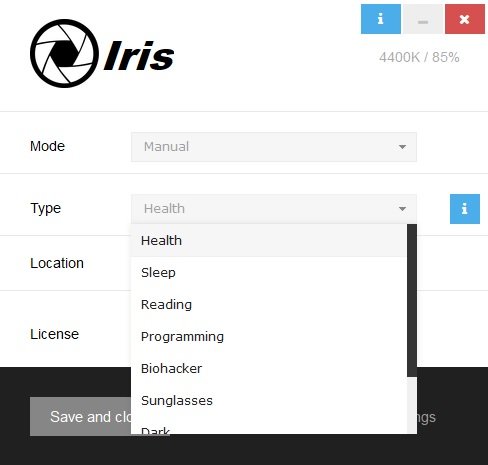
    Iris helps you to adjust the screen brightness and also reminds you to take breaks after a specified period of time. It is a simple program and comes with an elegant interface. The main overview gives you everything, where you can adjust the configurations. The software comes with nine free presets – Health, Reading, Programming, Biohacker, Sunglasses, Dark, Movie, and Overlay.

    iris video

    Advertising

    In addition, there are three different modes: automatic, manual and paused.

    • Auto mode– If you select the automatic mode, the software will automatically detect the light around you and lower the screen brightness accordingly to calm your eyes when working on your computer.
    • manual– In manual mode, of course, you have to manually choose the type from the nine preset settings.
    • at rest– This mode temporarily interrupts the program and you can activate it at any time.

    How does iris help

    • The free Iris program helps you keep your eyes healthy. Reduces eye strain when working on computers for long hours. Optimizes the screen with PWM-free brightness control which prevents eyestrain and reduces headaches.
    • It automatically adapts the light around you and matches the screen brightness accordingly, reducing eye pain and also keeping your eyes comfortable when working on computers for long hours.
    • The iris regulates blue lights, which helps your body produce more melatonin at night, and you’ll get good sleep that’s again commensurate with good health.

    iris characteristicsAeristic

    • Automatically adapts to the lights around you
    • Reduce eye strain during long hours working on computers.
    • Turns your computer screen into a book in reading mode.
    • Gives perfect black screen for programming.
    • Helps maintain the health of your eyes.
    • Putting on sunglasses gives you flicker-free brightness.
    • Dark mode reduces brightness without changing brightness.
    • Special red and black screen in Biohacker mode.
    • Brighter screen for watching movies.
    • Overlay mode is ideal for USB monitors.

    Iris offers a practical solution for anyone who is concerned about their eye health due to prolonged computer use. It helps you adjust the temperature, color, and brightness of your computer screen and ensures that your eyes are not strained.

    Iris offers a free version as well as a paid version – but the free version should suffice for most users. You can download the tool from iristech.co.

    read moreWorkrave is a desktop time management software.

    svg %3E

    Annie Proulx

    “Subtly charming problem solver. Extreme tv enthusiast. Web scholar. Evil beer expert. Music nerd. Food junkie.”

    Share. Facebook Twitter Pinterest LinkedIn Tumblr Email
    Annie Proulx

    "Subtly charming problem solver. Extreme tv enthusiast. Web scholar. Evil beer expert. Music nerd. Food junkie."

    Related Posts

    Rare Earth Metals: Essential Uses and the Global Supply Chain

    October 4, 2025

    200 meteorites found on Earth could be linked to Martian craters, allowing new insight into Mars’ history

    August 28, 2024

    Antibiotics that reduce the risk of stomach cancer

    August 26, 2024
    Top Posts

    Digital Transformation and Economic Resilience: Navigating the Digital Landscape in Canada’s Economy

    February 14, 2024316 Views

    Zodiac – Detailed Review of an Online Casino

    October 7, 2021290 Views

    Gambling as a Way to Earn Money

    March 31, 2022260 Views

    How to Pertain Real Estate Appraisal

    April 23, 2022241 Views
    Don't Miss
    Business

    Making the Most of Retirement in Vaughan: Practical Financial Strategies for Retirees and Pre-Retirees

    May 18, 202617 Views

    Retirement in Vaughan can be rewarding, but it also takes planning. Many local retirees want…

    Budget-friendly trips in Canada: How to plan a day out at Ontario casinos without overspending

    April 13, 2026

    Hamilton Expands Cycling Network with New Federal Investment

    March 28, 2026

    Canadians Remain Eager to Travel as Costs and Global Tensions Reshape Plans

    March 11, 2026
    Stay In Touch
    • Facebook
    • Twitter
    • Pinterest
    • Instagram
    • YouTube
    • Vimeo

    Subscribe to Updates

    Get the latest creative news from SmartMag about art & design.

    About Us

    We cover culture, entertainment, travel, food, wellness, and real-life stories from across Vaughan and beyond.

    We’re currently accepting new media partnerships, brand collaborations, and editorial contributions.

    Email: [email protected]

    Contact: +1-416-555-0134

    Facebook X (Twitter) Pinterest YouTube WhatsApp
    Our Picks

    Making the Most of Retirement in Vaughan: Practical Financial Strategies for Retirees and Pre-Retirees

    May 18, 2026

    Budget-friendly trips in Canada: How to plan a day out at Ontario casinos without overspending

    April 13, 2026

    Hamilton Expands Cycling Network with New Federal Investment

    March 28, 2026
    Most Popular

    Biden leads Trump in six swing states

    November 3, 20200 Views

    BYU vs. Boise State Score: No. 9 Cougars make an affirmative statement in defeating the No. 21 Broncos

    November 7, 20200 Views

    Five tips from President-elect Biden’s victory speech

    November 8, 20200 Views
    • About Us
    • DMCA
    • Contact Form
    • Privacy Policy
    © 2026 VaughanToday.ca — Canadian Lifestyle News & Features. All Rights Reserved.

    Type above and press Enter to search. Press Esc to cancel.