

Advertising
With computers in almost every workplace, eye strain has become a major health problem. Whether it is a school or a workplace, we have computers everywhere, which is the reason why every one of us suffers from eye strain problems. While using proper light, limiting computer use, and exercising are some of the best ways to avoid eye strain, it’s easier said than done. There are good apps and software that help us keep our eyes healthy. iris It is one of those applications that help us adjust screen brightness and take breaks.
Iris Protection Program
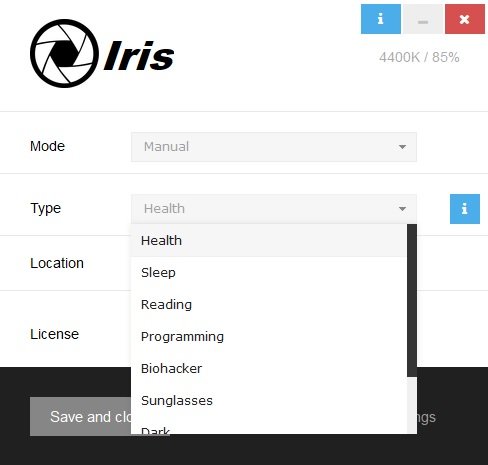
Iris helps you to adjust the screen brightness and also reminds you to take breaks after a specified period of time. It is a simple program and comes with an elegant interface. The main overview gives you everything, where you can adjust the configurations. The software comes with nine free presets – Health, Reading, Programming, Biohacker, Sunglasses, Dark, Movie, and Overlay.

Advertising
In addition, there are three different modes: automatic, manual and paused.
- Auto mode– If you select the automatic mode, the software will automatically detect the light around you and lower the screen brightness accordingly to calm your eyes when working on your computer.
- manual– In manual mode, of course, you have to manually choose the type from the nine preset settings.
- at rest– This mode temporarily interrupts the program and you can activate it at any time.
How does iris help
- The free Iris program helps you keep your eyes healthy. Reduces eye strain when working on computers for long hours. Optimizes the screen with PWM-free brightness control which prevents eyestrain and reduces headaches.
- It automatically adapts the light around you and matches the screen brightness accordingly, reducing eye pain and also keeping your eyes comfortable when working on computers for long hours.
- The iris regulates blue lights, which helps your body produce more melatonin at night, and you’ll get good sleep that’s again commensurate with good health.
iris characteristics
- Automatically adapts to the lights around you
- Reduce eye strain during long hours working on computers.
- Turns your computer screen into a book in reading mode.
- Gives perfect black screen for programming.
- Helps maintain the health of your eyes.
- Putting on sunglasses gives you flicker-free brightness.
- Dark mode reduces brightness without changing brightness.
- Special red and black screen in Biohacker mode.
- Brighter screen for watching movies.
- Overlay mode is ideal for USB monitors.
Iris offers a practical solution for anyone who is concerned about their eye health due to prolonged computer use. It helps you adjust the temperature, color, and brightness of your computer screen and ensures that your eyes are not strained.
Iris offers a free version as well as a paid version – but the free version should suffice for most users. You can download the tool from iristech.co.
read moreWorkrave is a desktop time management software.


Sophie Laurent is a contributor to Vaughantoday.ca, covering a wide range of topics including local news, politics, business, technology, sports, entertainment, and lifestyle. She focuses on delivering clear, balanced reporting that helps readers stay informed about current events and issues that matter to their communities. Sophie is committed to presenting accurate information, practical insights, and relevant stories in a straightforward and reader-friendly manner, making complex topics accessible to a broad audience.