

Nearly four months after the first release QTS 5.0.1 BetaHere is the final version. This release mainly focuses on securing the NAS system. Its numbering can make it think it’s about a minor version. However, as you will see later, this version is very important. Don’t forget to update your status!!!

QNAP QTS 5.0.1.1 Update
QTS 5.0.1 brings its share of improvements and many corrections, but also some new features. Let’s take a closer look at the changelog.
QTS 5.0.1: It’s new!
- QTS now supports access protection settings on the RTRR and Rsync protocols from a file control Board ;
- The control Board Displays the maximum processor speed;
- You can now configure the desktop icon size and font size in the desktop bar and taskbar;
- Q . station : Share a shared folder via a share link.
- sNetwork and default switch Now displays the MTU (Maximum Transmission Unit) values of the network interfaces;
- QTS now supports the Microsoft Windows Search protocol. This allows you to perform quick searches for files and folders in shared folders installed on Windows 10 via SMB;
- You can now use exFAT on an ARM-based NAS without purchasing a license (note: this was already the case with x86 models);
- Storage and snapshots Now supports Replace and Disconnect, which allows data to be copied from a failed drive to a backup drive and then safely disconnected from the failed drive.
QTS 5.0.1: Numerous improvements
This new version of QTS brings improvements mainly around NAS security:
- Adjust live update settings and auto update settings in one user interface;
- Improved notifications for updates. Users can choose to postpone or cancel updates before the specified update time;
- New setting for automatic updates: Security updates;
- Added option to force users to change password on first login. When importing users, you can now force users to change their password when they log in for the first time;
- Administrators will receive a notification if a recommended firmware update is available (note: this feature is enabled by default);
- PHP 7.4.20 version upgrade;
- Users can now enable SMB signing for NAS devices not joined to the domain;
- QTS automatically sets the minimum SMB version to SMB v2 sUnless your current setting is equal to or greater than this ;
- in Application Centerthe “Allow installation of applications without a valid digital signature” option is now disabled by default;
- Some information has been removed from the login screen, in an effort to improve device security;
- The system now asks the ‘admin’ user to change the default password if the user is logged in with it.
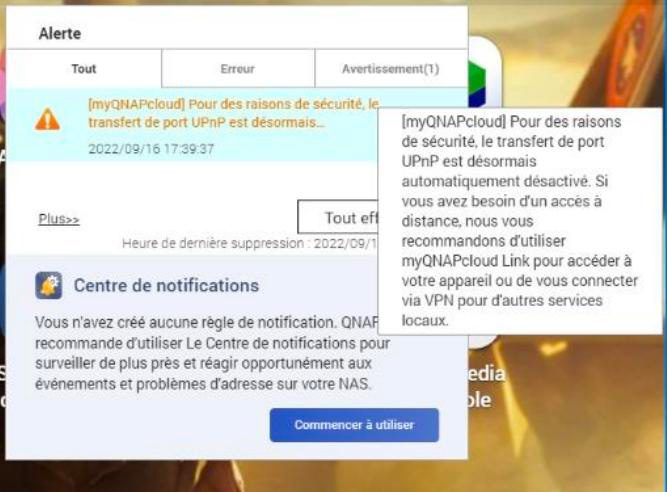
Note that QTS 5.0.1 disables UPnP on its NAS. As a reminder, this function simplifies the opening of network ports on the router / operator box from the NAS. Unfortunately, it is often the source of configuration errors and attacks (read our article UPnP: A friend wishes you well…or not!), from all manufacturers. QNAP’s decision is radical and a step in the right direction. It certainly won’t help a newbie to access the NAS remotely (there are alternatives). However, it must also be remembered that UPnP is often activated for no reason (by mistake, by ignorance, simply) and the function responsible for many attacks.
Which NAS is compatible with QTS 5.0.1?
The list of compatible NAS is rather long (over a hundred). You can find the full list by going to in the Official Gazette.
Download and install QTS 5.0.1
Note that this final version is the same as the RC2 version, so whoever has the latter does not need to update to this final version. But it can be applied.
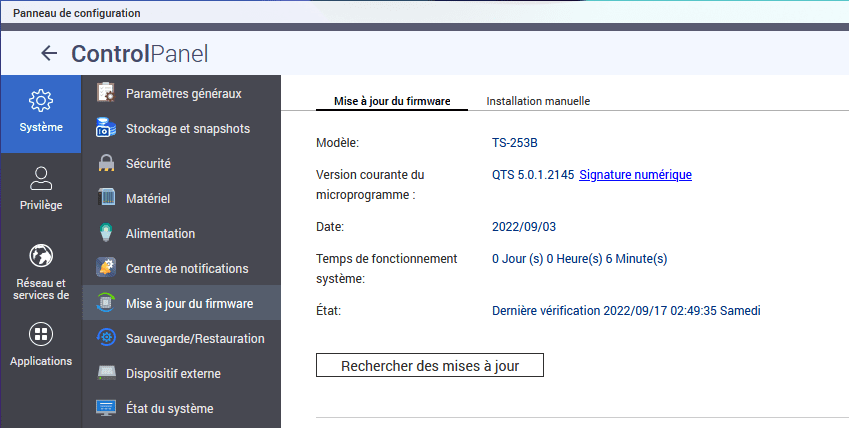
From the QTS interface, go to control Boardand then System and finally Firmware update. Click “Check for updates”then let the installer guide you to install the latest available update.
Manually, you will have to download it from a file Manufacturer’s official page. Choose NAS / expansion then number of bays (the location of the disk) that your network box contains. Finally, select the model. There a menu opens and you will have to search for the line named 5.0.1.2145 And select your region (Europe for example). The recovered ZIP file is about 200 MB in size, and QNAP recommends decompressing the archive, but it is not required. Then on the NAS, go to control Board and then System And the Firmware Updatethen go to the tab Manual installation. Click the button browse to select the previously downloaded archive (Or a .img file if you decompress the archive). Finally, just click Update the system. Then the system asks you to confirm, but also whether or not you want to restart the server after applying the update ( We highly recommend leaving server restart checked ). It only remains to wait about ten minutes to find QTS 5.0.1.

Evan McKenzie is a contributor at Vaughantoday.ca, covering a wide range of topics including local news, politics, business, technology, sports, entertainment, and lifestyle. He focuses on clear, balanced reporting that helps readers stay informed about current events and issues that matter to their communities. His work aims to provide useful information, timely updates, and relevant stories presented in an accessible and reader-friendly way.