

Close Menu

    Subscribe to Updates

    Get the latest creative news from FooBar about art, design and business.

    What's Hot

    As David Barrick Takes the Helm in Whitehorse, a Close Examination of His Record Tells a Reassuring Story

    October 20, 2026

    Landmark Cinemas Bolton Upgrades to Laser Ultra Ahead of Holiday Movie Season

    October 17, 2026

    CAA Urges Ontario Drivers to Slow Down and Move Over as Roadside Safety Law Expands in 2027

    October 17, 2026
    Facebook X (Twitter) Instagram
    Vaughan TodayVaughan Today
    • Home
    • Top News
    • World
    • Banking
    • Explore Canada
    • How to
    • Solutions
    • Contact Us
    • Editorial Policy
    Vaughan TodayVaughan Today
    Home»Tech»How to set apps to always run as administrator for convenience on Windows 10 or Windows 11
    Tech

    How to set apps to always run as administrator for convenience on Windows 10 or Windows 11

    Evan McKenzieBy Evan McKenzieAugust 20, 2022No Comments3 Mins Read
    Facebook Twitter Pinterest LinkedIn Tumblr Email
    How to set apps to always run as administrator for convenience on Windows 10 or Windows 11
    Share
    Facebook Twitter LinkedIn Pinterest Email Copy Link

    What do you do to open an app for “Execute as administratoron Windows 11? Previously, we showed you how to open PowerShell to run as administrator, which is necessary to run elevated application commands on Windows 11.

    Windows does not open applications with higher privileges by default. If this is an app that you use regularly and you need to run the app with elevated privileges, it might be a good idea to modify the app to always run as an administrator to make things more convenient for you.

    What does “run as administrator” mean?

    Run applications as administrator It just means that you are running the app with elevated permissions. Administrator refers to someone who can make changes to a computer that will affect other users of that computer.

    Advertising

    Running the app as an administrator means that you are running the app with elevated permissions. Administrators can edit Security settings, install software and hardware, access all files on the computer, and make changes to other user accounts on the computer.

    please note: yesYou must have an administrator account To follow the instructions in this guide.

    Always run an app as administrator on Windows 11

    Once you are logged in with an administrator account on your computer, you can change any application to always run as an administrator with elevated privileges.

    This is what you have to do.

    1. Open Started
    2. Find the app you want to run as administrator
    3. Right click on the first result and select Open file location. Alternatively, you can also click Open file location Also from the app search results.
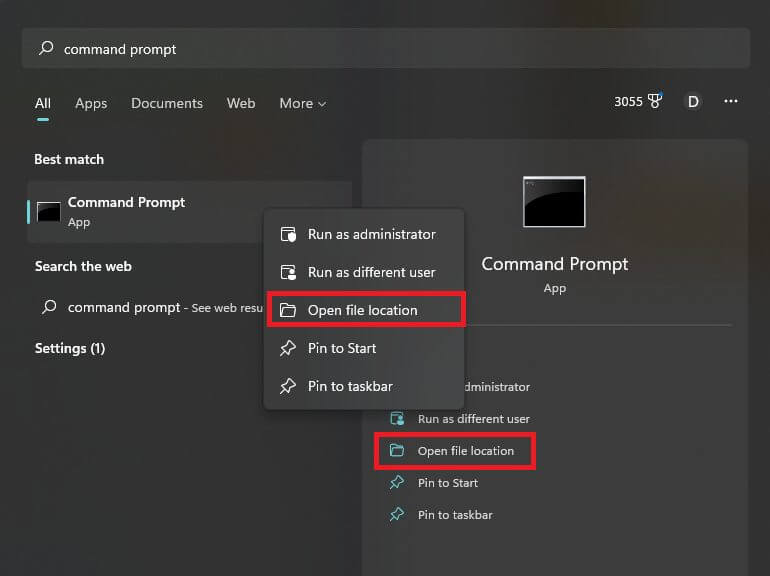
    Execute as administrator


    4. Right-click on the application shortcut and click Properties.
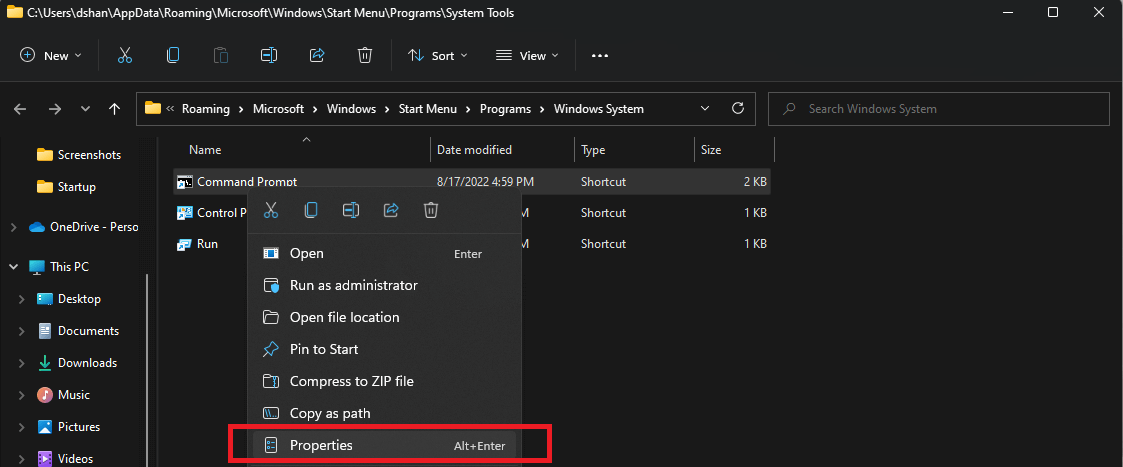
    Execute as administrator
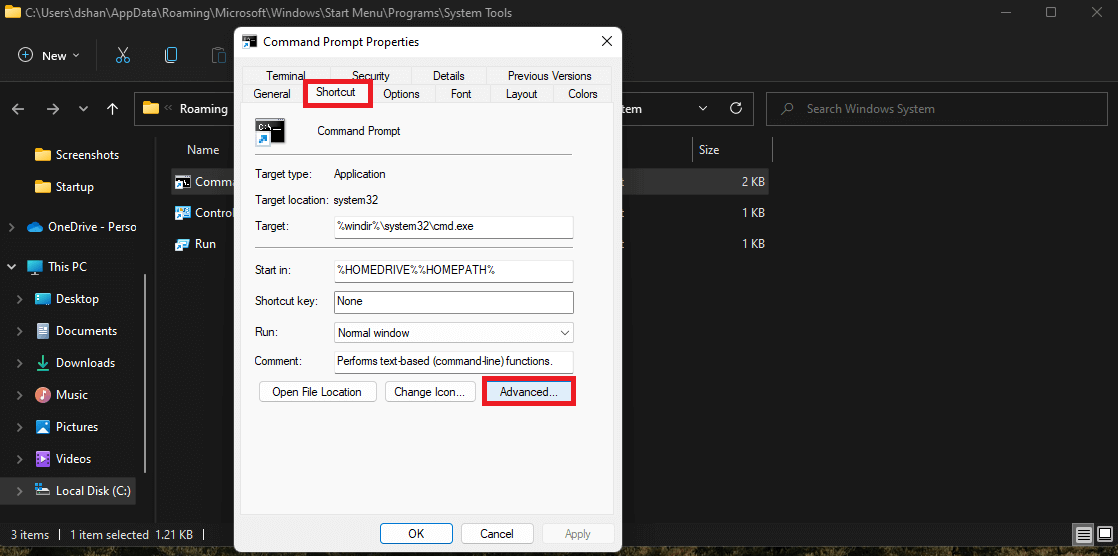
    5. Click abbreviation Tongue.
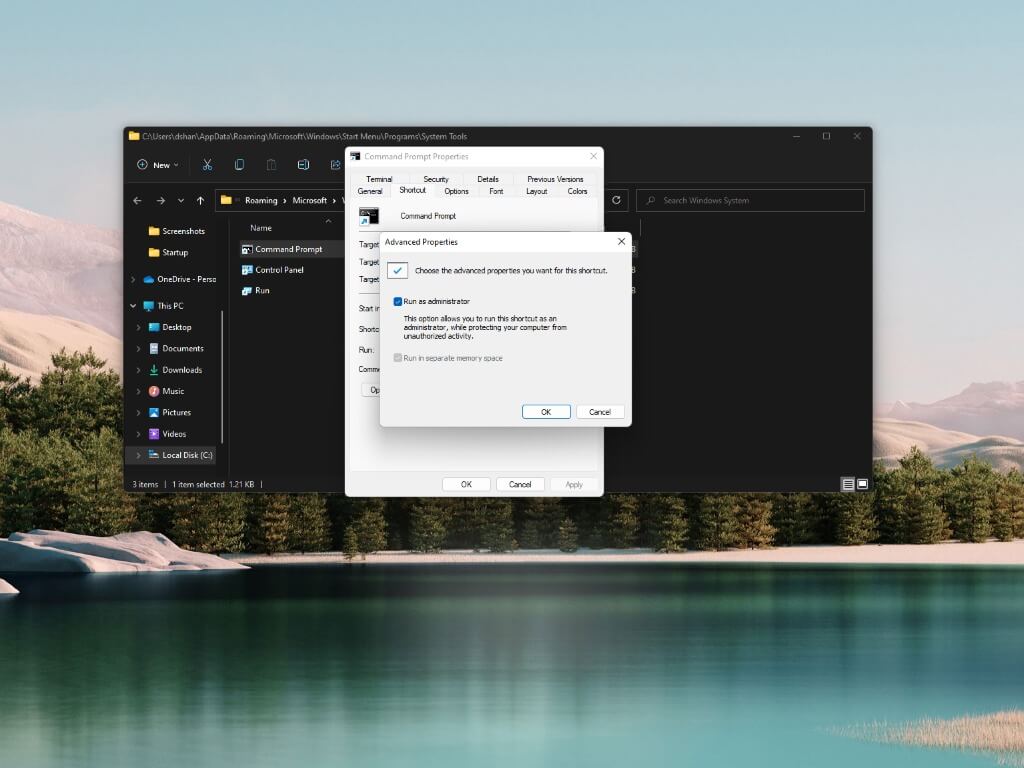
    6. Click advanced button.Execute as administrator
    7. Select the Run as administrator option and click Good To save your changes in advanced features.
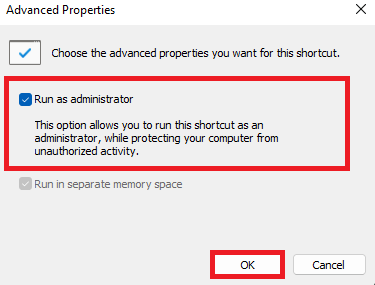
    Execute as administrator
    8. Click Progressing to confirm and save the changes.
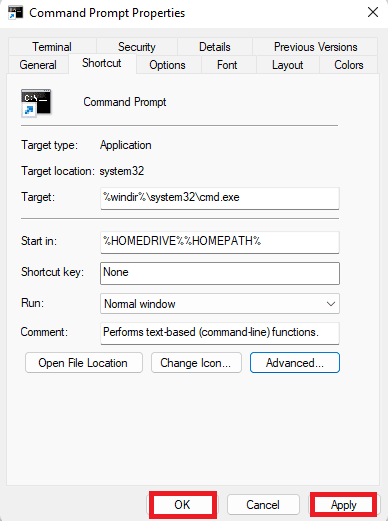
    Execute as administrator
    9. Click Good To close the application properties menu.

    Once you complete these steps, every time you start the app you configured, it will run as Administrator and have elevated permissions to make changes, just like Administrator.

    If you are using the default (and recommended) User Account Control (UAC) settings, you will need to confirm the UAC prompt to continue opening the application to run as an administrator.

    At any time, you can undo your changes by repeating the above steps and remove The Run as administrator option (step 7).

    Although this guide is meant to help users always run apps as an administrator on Windows 11, you can also use the same instructions on Windows 10.

    Share this post:

    Evan McKenzie

    Evan McKenzie is a contributor at Vaughantoday.ca, covering a wide range of topics including local news, politics, business, technology, sports, entertainment, and lifestyle. He focuses on clear, balanced reporting that helps readers stay informed about current events and issues that matter to their communities. His work aims to provide useful information, timely updates, and relevant stories presented in an accessible and reader-friendly way.

    Share. Facebook Twitter Pinterest LinkedIn Tumblr Email

    Related Posts

    Motorola Razr Fold Hands-On at MWC 2026: Dual 6,000-Nit Displays Raise the Bar

    March 3, 2026

    MSI Unveils Black Friday Discounts on Flagship Laptops and Handhelds

    November 1, 2025

    Rare Earth Metals: Essential Uses and the Global Supply Chain

    October 4, 2025
    Top Posts

    Windows 11, Microsoft is improving and improving the start menu

    March 2, 2022711 Views

    Zodiac – Detailed Review of an Online Casino

    October 7, 2021447 Views

    Gambling as a Way to Earn Money

    March 31, 2022410 Views

    How to Pertain Real Estate Appraisal

    April 23, 2022407 Views
    Don't Miss
    Top News

    As David Barrick Takes the Helm in Whitehorse, a Close Examination of His Record Tells a Reassuring Story

    October 20, 202626 Views

    A city manager is rarely the best-known person at city hall. The mayor speaks for…

    Landmark Cinemas Bolton Upgrades to Laser Ultra Ahead of Holiday Movie Season

    October 17, 2026

    CAA Urges Ontario Drivers to Slow Down and Move Over as Roadside Safety Law Expands in 2027

    October 17, 2026

    GTA 6 Development Continues as Rockstar Prepares for November 19 Release

    October 17, 2026
    About Us

    We cover culture, entertainment, travel, food, wellness, and real-life stories from across Vaughan and beyond.

    We’re currently accepting new media partnerships, brand collaborations, and editorial contributions.

    Email: [email protected]

    Contact: +1-416-555-0134

    Our Picks

    As David Barrick Takes the Helm in Whitehorse, a Close Examination of His Record Tells a Reassuring Story

    October 20, 2026

    Landmark Cinemas Bolton Upgrades to Laser Ultra Ahead of Holiday Movie Season

    October 17, 2026

    CAA Urges Ontario Drivers to Slow Down and Move Over as Roadside Safety Law Expands in 2027

    October 17, 2026
    Most Popular

    Russian President Putin congratulates Joe Biden on his election victory

    December 15, 20200 Views

    Biden announces a bill to grant citizenship to illegal immigrants

    January 17, 20210 Views

    A show noticed when Joe Biden was nominated, before a gala evening

    January 22, 20210 Views
    • About Us
    • Contact Us
    • DMCA
    • Editorial Policy
    • Privacy Policy
    © 2026 VaughanToday.ca — Canadian Lifestyle News & Features. All Rights Reserved.

    Type above and press Enter to search. Press Esc to cancel.