

Close Menu
    Facebook X (Twitter) Instagram
    Trending
    • Hauser’s Marks 45 Years With Province-Wide Customer Celebration and Renewed Focus on Community Care
    • Young drivers face elevated collision risks after consuming edible cannabis, new CAA-funded study finds
    • Salvation Army Thrift Store Marks 40th Ontario Location with Peterborough Opening
    • Early Blast of Winter Prompts Safety Warnings from Ontario Road Authorities
    • HONOR Takes Home Two TIME Best Inventions 2025 Awards for Smartphone Breakthroughs
    • Toronto Set to Host Largest LEGO® Fan Event in Canadian History
    • Hank Azaria and Caitlin Morrison Champion Mental Health Through Music at Toronto’s Koerner Hall
    • Bricks in the Six to Build Canada’s Largest-Ever LEGO® Fan Event This November
    Facebook X (Twitter) Instagram YouTube
    Vaughan TodayVaughan Today
    • Home
    • Top News
    • World
    • Banking
    • Explore Canada
    • How to
    • Solutions
    • Contact Form
    Vaughan TodayVaughan Today
    Home»Tech»How to activate YouTube Picture-In-Picture (PiP) on iPhone now
    Tech

    How to activate YouTube Picture-In-Picture (PiP) on iPhone now

    Jillian CastilloBy Jillian CastilloAugust 25, 2021No Comments2 Mins Read
    How to activate YouTube Picture-In-Picture (PiP) on iPhone now
    Share
    Facebook Twitter LinkedIn Pinterest Email

    Picture-In-Picture mode is very convenient for continuing to watch a YouTube video using other applications. Here’s how to use it on iPhone now.
    Source: Onur Binay on Unsplash

    Source: Onur Binay on Unsplash

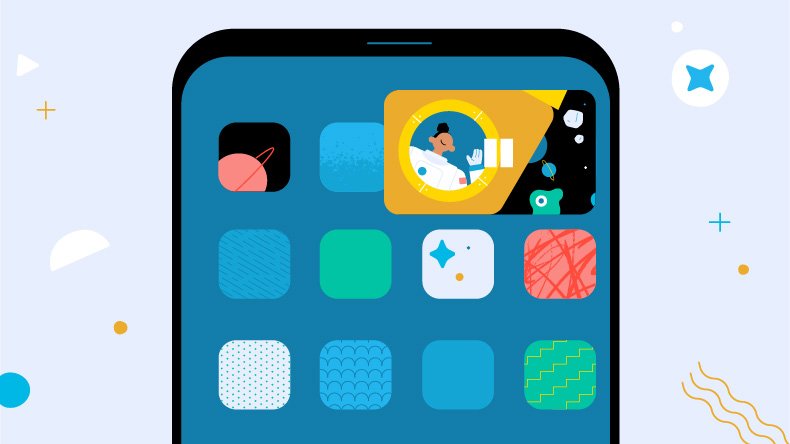
    If you have subscribed to YouTube Premium, you will not see ads on Youtube Which is already tangible, but in addition to this, you can access certain functions in advance. This is the state of Picture-In-Picture during the testing phase on iPhone Which officially started in June. As the name suggests, Picture-In-Picture or PiP allows you to keep the image and audio of a YouTube video in a small frame on the screen, while using another application. Useful if you want to track a show, but chat with friends on Discord, or follow your thread on Twitter.

    On the iPhone, it is now much easier to participate in the test.

    Test Picture-in-Picture Commenting on iPhone

    The feature has been around for a long time on Android, but it is taking a long time to reach the iPhone. By participating in a test, it becomes easy to activate it on your Apple smartphone.

    • day meeting YouTube.com/new . page (must be YouTube Premium)
    • Chercher “Picture in Picture on iOS”
    • Choose “try”

    To test the functionality on your iPhone, here is the procedure.

    • Start a YouTube video
    • Return to the Home page on your iPhone using the Touch ID button or a gesture from the bottom of the screen
    How to activate YouTube Picture-In-Picture (PiP) on iPhone now

    On the YouTube Experiments page, Google specifies that the PiP testing period is open until October 31. We imagine the company plans to start rolling out this functionality to all users by that date. According to Google’s promise in June, all YouTubers will be able to enjoy PiP in the US. It remains to be seen whether the openness to users of the free service will extend to Europe and France specifically.

    Share. Facebook Twitter Pinterest LinkedIn WhatsApp Reddit Tumblr Email
    Jillian Castillo

    "Proud thinker. Tv fanatic. Communicator. Evil student. Food junkie. Passionate coffee geek. Award-winning alcohol advocate."

    Related Posts

    MSI Unveils Black Friday Discounts on Flagship Laptops and Handhelds

    November 1, 2025

    Rare Earth Metals: Essential Uses and the Global Supply Chain

    October 4, 2025

    Bell error 2000: Troubleshoot and Solutions

    June 4, 2023
    Facebook X (Twitter) Instagram Pinterest
    © 2025 ThemeSphere. Designed by ThemeSphere.

    Type above and press Enter to search. Press Esc to cancel.