

Close Menu
    Facebook X (Twitter) Instagram
    Trending
    • Hauser’s Marks 45 Years With Province-Wide Customer Celebration and Renewed Focus on Community Care
    • Young drivers face elevated collision risks after consuming edible cannabis, new CAA-funded study finds
    • Salvation Army Thrift Store Marks 40th Ontario Location with Peterborough Opening
    • Early Blast of Winter Prompts Safety Warnings from Ontario Road Authorities
    • HONOR Takes Home Two TIME Best Inventions 2025 Awards for Smartphone Breakthroughs
    • Toronto Set to Host Largest LEGO® Fan Event in Canadian History
    • Hank Azaria and Caitlin Morrison Champion Mental Health Through Music at Toronto’s Koerner Hall
    • Bricks in the Six to Build Canada’s Largest-Ever LEGO® Fan Event This November
    Facebook X (Twitter) Instagram YouTube
    Vaughan TodayVaughan Today
    • Home
    • Top News
    • World
    • Banking
    • Explore Canada
    • How to
    • Solutions
    • Contact Form
    Vaughan TodayVaughan Today
    Home»Tech»Google Gboard will make it easy for you to send a screenshot
    Tech

    Google Gboard will make it easy for you to send a screenshot

    Jillian CastilloBy Jillian CastilloMay 12, 2021No Comments2 Mins Read
    Google Gboard will make it easy for you to send a screenshot
    Share
    Facebook Twitter LinkedIn Pinterest Email

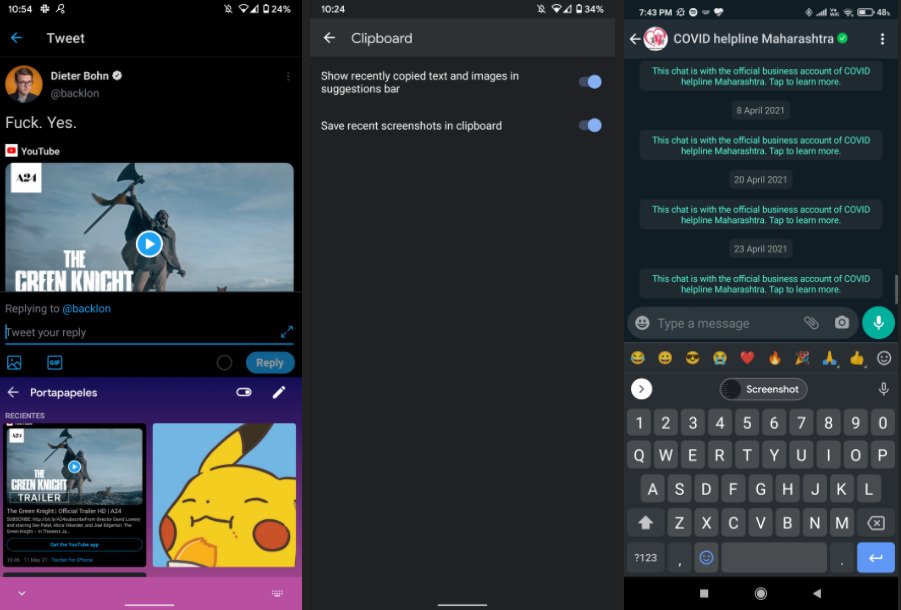
    The latest beta version of Google Gboard automatically saves a screenshot to the app clipboard, then share it with one click. This feature should make sense for the general public in the near future.
    Trial versions of our mobile apps are useful for getting a preview of one or more upcoming features. This is for example the case of Google Gboard, whose latest beta highlights a new functionality that should be very practical for users.

    You may have already noticed the keyboard Google Gboard Natively integrates clipboard manager. Today, for example, it is possible to copy and paste text, URL or phone number with a single click into a live chat across the clipboard.

    Send a screenshot with one click

    This little trick saves additional time and improves the user experience, since you no longer need to keep pressing your screen to display a popup asking you to paste your text. Well at idea, Google Gboard also wants to apply this little sleight of hand to your screenshots.
    Source: Android Police via Armando

    Source: Android Police via Armando

    As noted 9To5GoogleThe trial version lets you send a file A screen shot There is also a one-click, as it is previously saved to your Google Gboard clipboard. Also, this manager will save all recent screenshots.

    Make it easy to share multiple screenshots

    This would make it practical for many to take part Screenshots At the same time, they are stored in the same place which can be accessed directly from a conversation for example. to me Android Police, This feature can be activated or deactivated manually, as is already the case in the beta version.

    At the time of writing, Google is likely to test the novelty on a small panel of users. Our beta version of Gboard, for example, does not have access to it. Without a doubt, Mountain View should roll out this feature more widely in the near future.

    Share. Facebook Twitter Pinterest LinkedIn WhatsApp Reddit Tumblr Email
    Jillian Castillo

    "Proud thinker. Tv fanatic. Communicator. Evil student. Food junkie. Passionate coffee geek. Award-winning alcohol advocate."

    Related Posts

    MSI Unveils Black Friday Discounts on Flagship Laptops and Handhelds

    November 1, 2025

    Rare Earth Metals: Essential Uses and the Global Supply Chain

    October 4, 2025

    Bell error 2000: Troubleshoot and Solutions

    June 4, 2023
    Facebook X (Twitter) Instagram Pinterest
    © 2025 ThemeSphere. Designed by ThemeSphere.

    Type above and press Enter to search. Press Esc to cancel.