

Close Menu
    Facebook X (Twitter) Instagram
    Trending
    • Hauser’s Marks 45 Years With Province-Wide Customer Celebration and Renewed Focus on Community Care
    • Young drivers face elevated collision risks after consuming edible cannabis, new CAA-funded study finds
    • Salvation Army Thrift Store Marks 40th Ontario Location with Peterborough Opening
    • Early Blast of Winter Prompts Safety Warnings from Ontario Road Authorities
    • HONOR Takes Home Two TIME Best Inventions 2025 Awards for Smartphone Breakthroughs
    • Toronto Set to Host Largest LEGO® Fan Event in Canadian History
    • Hank Azaria and Caitlin Morrison Champion Mental Health Through Music at Toronto’s Koerner Hall
    • Bricks in the Six to Build Canada’s Largest-Ever LEGO® Fan Event This November
    Facebook X (Twitter) Instagram YouTube
    Vaughan TodayVaughan Today
    • Home
    • Top News
    • World
    • Banking
    • Explore Canada
    • How to
    • Solutions
    • Contact Form
    Vaughan TodayVaughan Today
    Home»Tech»IFixit assumptions about iPad mini 6 slow swipe
    Tech

    IFixit assumptions about iPad mini 6 slow swipe

    Jillian CastilloBy Jillian CastilloSeptember 30, 2021No Comments2 Mins Read
    IFixit assumptions about iPad mini 6 slow swipe
    Share
    Facebook Twitter LinkedIn Pinterest Email

    Slow swipe on iPad mini 6 screen, also known as ‘jelly swipe’, is a file normal behavior For Apple that recalled yesterday that this effect occurs on all LCD screens. Oddly enough, while this slow swipe hasn’t been noticed by anyone yet, with the new mini tablet it’s the most noticeable – but not by everyone.

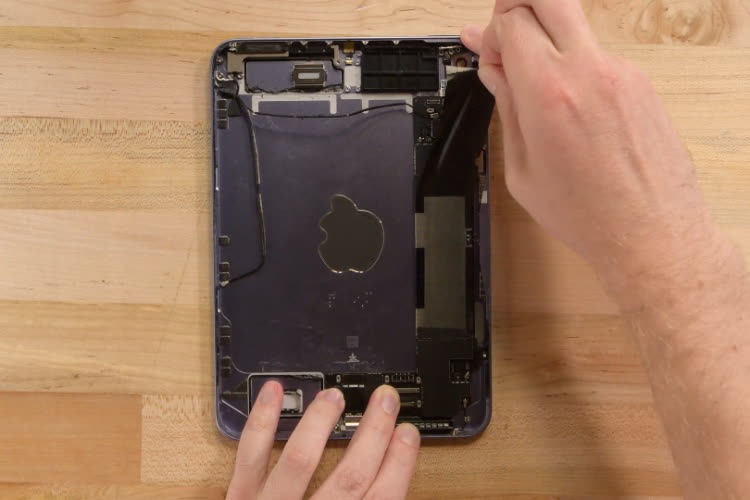
    In his video about the iPad mini, iFixit It presents two hypotheses. The first was quickly cleared because it is impossible to confirm at the moment, Apple would have used a lower quality tile for this model. The second is more interesting. The tablet screen controller is positioned vertically on the left side when holding the iPad mini vertically.

    Jelly Swipe on iPad mini 6 in slow motion.
    On the iPad Air 4, this ugly effect is less noticeable in portrait format, but more so in landscape mode.

    When using the tablet in portrait format, swiping the screen gives the impression that the text on the left “progresses” faster than the text on the right. The screen refreshes edge to edge, in a wave-like motion. The effect is less noticeable when using the iPad mini in landscape format, in which case the update is carried out line by line, parallel to the console.

    The in-display controller on the iPad mini 6 is positioned perpendicular to the top of the iPad Air 4.

    On the iPad Air in portrait mode, the controller is positioned at the top of the screen, which makes scrolling less cluttered in this format (but also less noticeable when using the iPad Air in landscape mode). On the iPad Pro, where the controller is also positioned vertically as on the iPad mini, the ProMotion display at 120Hz makes up for the slack in scrolling.

    iFixit I gave a repairability rating of 3 out of 10 for this new mini tablet, due to the adhesive components (including the battery) and the use of adhesives that limit or prevent repairs.

    Share. Facebook Twitter Pinterest LinkedIn WhatsApp Reddit Tumblr Email
    Jillian Castillo

    "Proud thinker. Tv fanatic. Communicator. Evil student. Food junkie. Passionate coffee geek. Award-winning alcohol advocate."

    Related Posts

    MSI Unveils Black Friday Discounts on Flagship Laptops and Handhelds

    November 1, 2025

    Rare Earth Metals: Essential Uses and the Global Supply Chain

    October 4, 2025

    Bell error 2000: Troubleshoot and Solutions

    June 4, 2023
    Facebook X (Twitter) Instagram Pinterest
    © 2025 ThemeSphere. Designed by ThemeSphere.

    Type above and press Enter to search. Press Esc to cancel.