

Close Menu
    Facebook X (Twitter) Instagram
    Trending
    • Hauser’s Marks 45 Years With Province-Wide Customer Celebration and Renewed Focus on Community Care
    • Young drivers face elevated collision risks after consuming edible cannabis, new CAA-funded study finds
    • Salvation Army Thrift Store Marks 40th Ontario Location with Peterborough Opening
    • Early Blast of Winter Prompts Safety Warnings from Ontario Road Authorities
    • HONOR Takes Home Two TIME Best Inventions 2025 Awards for Smartphone Breakthroughs
    • Toronto Set to Host Largest LEGO® Fan Event in Canadian History
    • Hank Azaria and Caitlin Morrison Champion Mental Health Through Music at Toronto’s Koerner Hall
    • Bricks in the Six to Build Canada’s Largest-Ever LEGO® Fan Event This November
    Facebook X (Twitter) Instagram YouTube
    Vaughan TodayVaughan Today
    • Home
    • Top News
    • World
    • Banking
    • Explore Canada
    • How to
    • Solutions
    • Contact Form
    Vaughan TodayVaughan Today
    Home»Tech»multimedia | Google pledges to simplify the transition from an iPhone to an Android smartphone
    Tech

    multimedia | Google pledges to simplify the transition from an iPhone to an Android smartphone

    Jillian CastilloBy Jillian CastilloApril 22, 2022No Comments2 Mins Read
    multimedia |  Google pledges to simplify the transition from an iPhone to an Android smartphone
    Share
    Facebook Twitter LinkedIn Pinterest Email

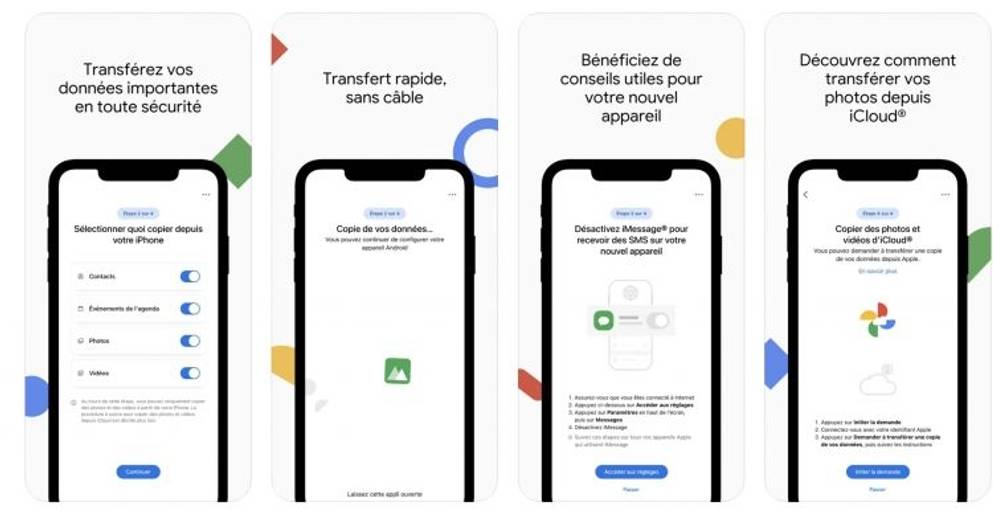
    (ETX Daily Up) – Google has decided to simplify the migration of data from iPhone to Android device, by launching an all-new dedicated app. Switch to Android, which is installed on the iPhone, allows you to manage the transfer of contacts, calendar, photos and videos step by step.

    Switching from an iPhone to an Android smartphone also means switching from the world of Apple to the world of Google. As a result, it is sometimes complicated to back up and transfer data from one device to another.

    In order to simplify this process, Google has developed a new application called “Switch to Android” (“Switch to Android” in the original version), which is supposed to facilitate the secure transfer of personal data (photos, videos, contacts, memos) from iPhone to Android terminal. In order to “connect the two devices”, the app displays a QR Code on the iPhone, to be scanned using the Android smartphone. Then, the app guides the user through each step, from deactivating iMessage to transferring various data. Be warned, though, that like many innovations from Google, this app initially only works with the Pixel range of smartphones. Application Switch to Android From Google for free from the App Store (iOS).

    Today, the best way to make this switch is also through an app, usually preinstalled by your phone manufacturer. However, the list of data to be transferred is sometimes limited. Regarding his contacts and his schedule, it is best to connect on his computer to iCloud and export them, so that he can then install them on his new smartphone via the settings of the Contacts app. For miscellaneous photos, videos, and documents, the easiest way is to copy them to Google Drive and photos from your iPhone so that you can then access them from any other smartphone.

    David Benard

    Share. Facebook Twitter Pinterest LinkedIn WhatsApp Reddit Tumblr Email
    Jillian Castillo

    "Proud thinker. Tv fanatic. Communicator. Evil student. Food junkie. Passionate coffee geek. Award-winning alcohol advocate."

    Related Posts

    MSI Unveils Black Friday Discounts on Flagship Laptops and Handhelds

    November 1, 2025

    Rare Earth Metals: Essential Uses and the Global Supply Chain

    October 4, 2025

    Bell error 2000: Troubleshoot and Solutions

    June 4, 2023
    Facebook X (Twitter) Instagram Pinterest
    © 2025 ThemeSphere. Designed by ThemeSphere.

    Type above and press Enter to search. Press Esc to cancel.