

Close Menu
    Facebook X (Twitter) Instagram
    Trending
    • Hauser’s Marks 45 Years With Province-Wide Customer Celebration and Renewed Focus on Community Care
    • Young drivers face elevated collision risks after consuming edible cannabis, new CAA-funded study finds
    • Salvation Army Thrift Store Marks 40th Ontario Location with Peterborough Opening
    • Early Blast of Winter Prompts Safety Warnings from Ontario Road Authorities
    • HONOR Takes Home Two TIME Best Inventions 2025 Awards for Smartphone Breakthroughs
    • Toronto Set to Host Largest LEGO® Fan Event in Canadian History
    • Hank Azaria and Caitlin Morrison Champion Mental Health Through Music at Toronto’s Koerner Hall
    • Bricks in the Six to Build Canada’s Largest-Ever LEGO® Fan Event This November
    Facebook X (Twitter) Instagram YouTube
    Vaughan TodayVaughan Today
    • Home
    • Top News
    • World
    • Banking
    • Explore Canada
    • How to
    • Solutions
    • Contact Form
    Vaughan TodayVaughan Today
    Home»Tech»The camera automatically removes the bright spots in the trial version
    Tech

    The camera automatically removes the bright spots in the trial version

    Jillian CastilloBy Jillian CastilloAugust 5, 2021No Comments2 Mins Read
    The camera automatically removes the bright spots in the trial version
    Share
    Facebook Twitter LinkedIn Pinterest Email

    The iOS 15 public beta improves on an important aspect of the iPhone camera. Bright spots that appear in bright light when a photo is taken are automatically removed in post-processing.

    the The fourth beta version of iOS 15 It was only launched a few days ago. All users can download it on iPhone and iPad to test what’s new in this version.
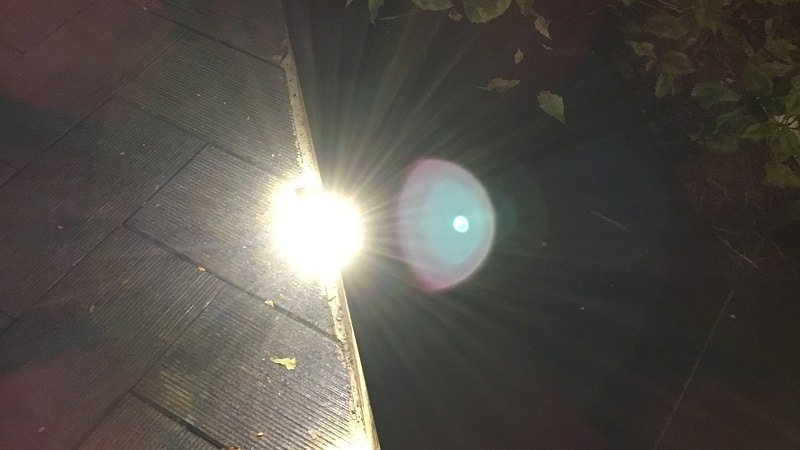
    Lens flare on iPhone
    Lens flare on iPhone – Credit: Depaac, CC BY-SA 4.0

    The iOS 15 beta brings a huge improvement regarding the camera. Bright spots are also called Spots of light or lens flare, they are automatically removed in post-processing, at least for the most part.

    Soon the end of lens flare that spoils photos?

    On reddit, user “u/Doubleluckstur” noted the novelty of iOS 15 Which should also include a new food tracking function. Share the landscape photo as it was taken and when it is saved in the gallery. When he takes the photo, a bright green dot appears to the left of the photo. After processing the program, The image saved in his gallery no longer has a point of light.

    Lens flare is a common phenomenon that bothers many users. It can actually spoil a well-formed image. These bright spots appear when there is a file strong light. For example, they are common for urban night shots.

    At the moment, we don’t know if all iPhone models have been affected by this improvement. One user was able to enjoy it on his iPhone XS while another did not see any change in his iPhone 8 Plus. According to the theory 9to5Mac, it may well be that only iPhones equipped with Apple A12 Bionic models and later Benefit from the best post-processing.

    iOS 15 doesn’t remove bright spots from videos yet

    In addition, other users have noted the limitations of this novelty. Bright spots are not always removed indoors with artificial light. It also does not appear to be recognizable if it is on foliage or mosquito net. Moreover, lens flare does not go away on videos.

    Finally, we can’t confirm whether The latest version of iOS 15 You will be able to remove these bright spots once and for all. Anyway, Apple is working on it. Moreover, Cupertino recently announced that Some Siri functions will disappear with iOS 15.

    Source : the edge

    Share. Facebook Twitter Pinterest LinkedIn WhatsApp Reddit Tumblr Email
    Jillian Castillo

    "Proud thinker. Tv fanatic. Communicator. Evil student. Food junkie. Passionate coffee geek. Award-winning alcohol advocate."

    Related Posts

    MSI Unveils Black Friday Discounts on Flagship Laptops and Handhelds

    November 1, 2025

    Rare Earth Metals: Essential Uses and the Global Supply Chain

    October 4, 2025

    Bell error 2000: Troubleshoot and Solutions

    June 4, 2023
    Facebook X (Twitter) Instagram Pinterest
    © 2025 ThemeSphere. Designed by ThemeSphere.

    Type above and press Enter to search. Press Esc to cancel.